
Introduction
The original goal was not to build a documentation platform. The original goal was to develop a monitoring framework for our data pipelines.
As that work began, it became obvious that the monitoring framework would generate and depend on a growing body of documentation. We needed pipeline inventories, trigger inventories, schedule expectations, pipeline criticality definitions, operational visibility documentation, monitoring standards, and support guidance. Those documents needed to live somewhere consistent, searchable, and easy to maintain.
At about the same time, I was going through training on the subsystem that loads our CRM data. That training generated its own documentation needs: architecture notes, pipeline explanations, trigger details, source-to-target context, operational support notes, and process observations that would have been easy to lose if they stayed in personal notes or meeting follow-ups. I needed a durable home for what I was learning.
That was the real starting point. There was no existing documentation site to improve. There was no mature repository waiting to be cleaned up. The documentation had to be created from scratch, and so did the place where it would live.
I wanted the documents in Markdown because Markdown is simple, portable, easy to version, and friendly to technical contributors. It works well in Git, it can be reviewed in pull requests, and it does not lock the team into a proprietary authoring tool. The problem was that I did not want everyone to have to open VS Code just to read or preview the documents. Markdown is a great authoring format, but a folder full of .md files is not the same thing as a usable documentation portal.
That question—how do we keep the simplicity of Markdown while giving users a browser-based documentation experience—led to MkDocs. It also became one of the best examples I have had of how AI can accelerate engineering work without replacing engineering judgment.
The First Question: How Do We Render Markdown?
The first practical problem was simple: I had Markdown files, or at least the beginnings of them, and I needed people to read them easily.
I asked AI how to render Markdown as a documentation site. That opened up several possible paths, including static site generators such as Jekyll, Hugo, Docusaurus, Sphinx, and MkDocs. I did not approach the decision as a formal platform evaluation with a large scoring matrix. The criteria were much more practical: simplicity, cost, time to market, and maintainability.
MkDocs stood out because it fit the problem without adding unnecessary complexity. It was built for project documentation, used Markdown natively, supported clean navigation, provided search, worked well with GitHub, and could be hosted using GitHub Pages. The Material for MkDocs theme made it possible to create something that looked polished without spending weeks building a custom front end.
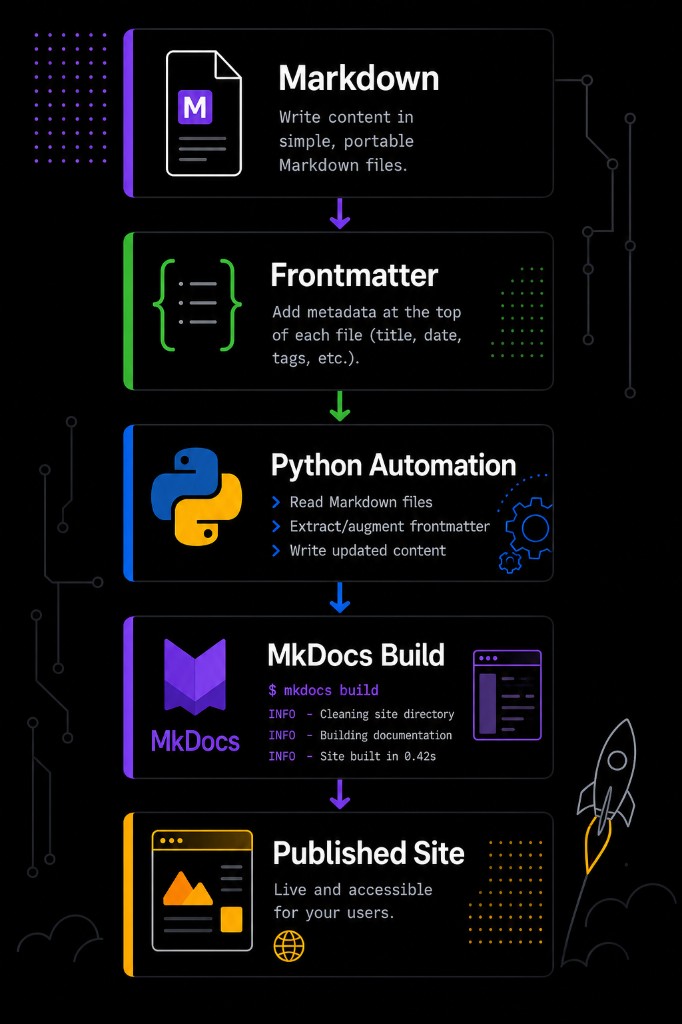
The decision to try MkDocs was important because it changed the shape of the project. I was no longer just creating documents. I was building a documentation platform.
The basic publishing flow became straightforward. Authors write Markdown. Frontmatter provides metadata. Python automation enriches or standardizes the files. MkDocs builds the static site. GitHub Pages hosts the published output. That combination gave us a low-cost, maintainable way to turn a repository of Markdown files into a usable internal documentation portal.
Why MkDocs Worked Well for This Use Case
The biggest benefit of MkDocs was that it let the documentation remain close to the engineering workflow. The source documents live in Git. Changes can be reviewed through pull requests. The site can be built automatically. The published result is easy for non-developers to browse in a browser.
That balance mattered. If the documentation platform had required too much ceremony, it would have slowed the work down. If it had been too loose, it would have become another unstructured collection of files. MkDocs provided just enough structure without getting in the way.
The navigation model was also a strong fit. As the monitoring framework took shape, the documentation naturally grouped into areas such as monitoring, standards, reporting, servicing, CRM-related pipelines, architecture, triggers, support, and templates. MkDocs made it possible to represent that hierarchy clearly while still keeping each document as a simple Markdown file.
Search was another immediate benefit. A monitoring framework produces many small but important facts: pipeline names, trigger names, owners, dependencies, schedules, SLAs, criticality levels, and support notes. A searchable site makes those facts easier to find than a shared folder or a long document.
GitHub Pages completed the picture. Hosting the site through GitHub Pages meant the documentation could be published from the same ecosystem where the source lived. GitHub Actions could build the site, and GitHub Pages could serve it. There was no need to introduce a separate server or hosting platform just to make Markdown readable.
The Documentation Grew Out of Real Work
The documentation was not created as an abstract exercise. It grew directly out of operational needs.
The monitoring framework required a clear understanding of which pipelines existed, what triggered them, how often they ran, which were most critical, and what support teams needed to know when something failed. That led to documents such as the pipeline inventory, trigger inventory, schedule expectations, pipeline criticality matrix, operational visibility roadmap, and monitoring standards.
The CRM subsystem training added another layer. As I learned how CRM data was loaded, transformed, and supported, I needed a place to capture that knowledge before it became tribal knowledge again. The documentation site became the place to store architecture notes, ETL flow explanations, trigger documentation, support considerations, and implementation details that would otherwise have been scattered across memory, chats, and ad hoc notes.
This was one of the early signs that the platform was solving the right problem. The site was not just a place to publish finished documentation. It became part of the learning process. As I learned a subsystem, I documented it. As I documented it, I found gaps. As I found gaps, I asked better questions. The documentation platform helped turn training into reusable organizational knowledge.
AI as a Development Partner
AI played a major role throughout the project, but not by magically producing a finished solution. Its value was more practical and more useful than that.
It helped me explore options quickly. When I asked how to render Markdown, it gave me a map of the landscape and helped compare the tradeoffs. It helped me understand why MkDocs might be a good fit and what alternatives would add or remove. It helped me move from a vague requirement—"I need people to read Markdown in a browser"—to a working architecture.
It also helped during implementation. I have taken several Python courses, including college-level coursework, but I had not written much production Python. Python still felt like the natural choice because it has become the go-to language for automation, scripting, data work, and tooling. AI made that choice easier to execute. It helped with YAML handling, Markdown parsing, file traversal, frontmatter updates, and Git metadata extraction. Instead of spending hours looking up library syntax or examples, I could focus on the behavior I wanted and iterate quickly.
The same pattern applied to GitHub Actions. I knew what I wanted the workflow to do: build the MkDocs site and publish it through GitHub Pages. AI helped translate that goal into working workflow files, troubleshoot problems, and refine the deployment process.
The result was not that AI replaced the engineering work. The result was that AI compressed the learning curve. It gave me enough context to make decisions, enough examples to start building, and enough feedback to keep moving when I hit unfamiliar territory.
From Static Documents to Automated Metadata
Once the basic site was working, the next question was how to keep it maintainable.
A documentation platform can start clean and still become messy if every document depends on manual upkeep. Metadata is a common example. Authors may forget to update dates, ownership, tags, or status fields. Over time, the documentation starts to look official while quietly drifting away from reality.
That led to the idea of using Git as the source of truth for document metadata. Git already knows when a file changed, who changed it, and what commit introduced the change. Rather than asking authors to maintain all of that manually, Python automation could extract Git metadata and write it into document frontmatter.
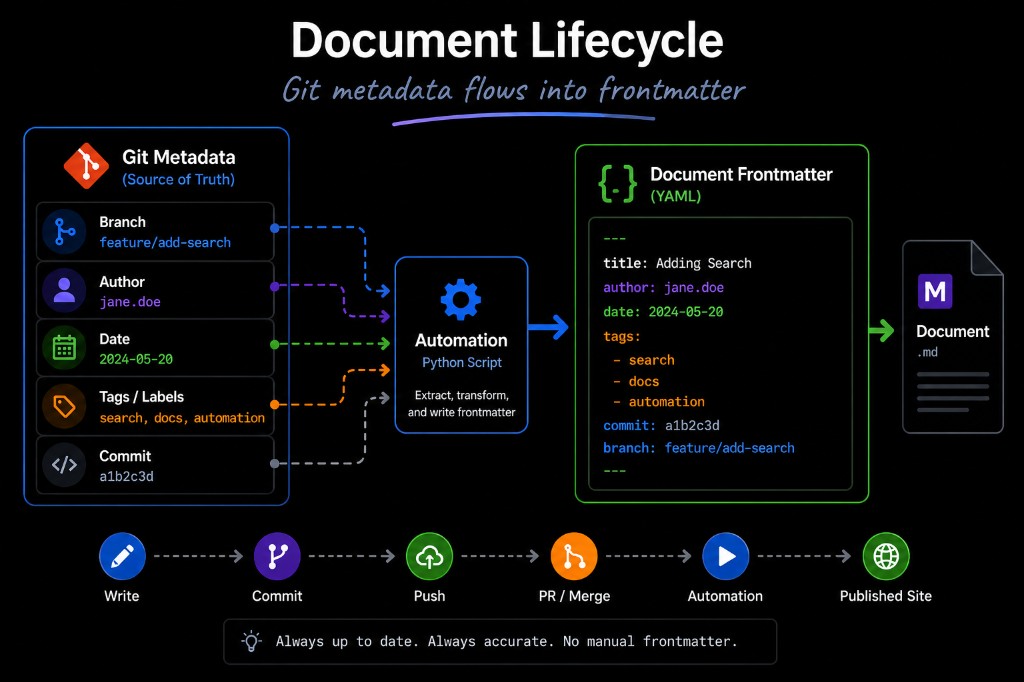
This became one of the most important improvements in the platform. Frontmatter made the documents more useful to MkDocs and to our own automation, while Git kept the metadata grounded in actual repository activity. The automation helped support recently updated pages, ownership visibility, document lifecycle tracking, and more consistent page metadata.
It also reinforced a larger principle: documentation should not require unnecessary manual maintenance. If a piece of information can be derived reliably from the repository, the system should derive it.
CI/CD for Documentation
After MkDocs and metadata automation were in place, the next step was publication. I did not want publishing documentation to become a manual process. If the documents were going to live in Git, then the publishing process should follow the same path as software delivery.
The workflow became branch, pull request, merge, build, and publish.
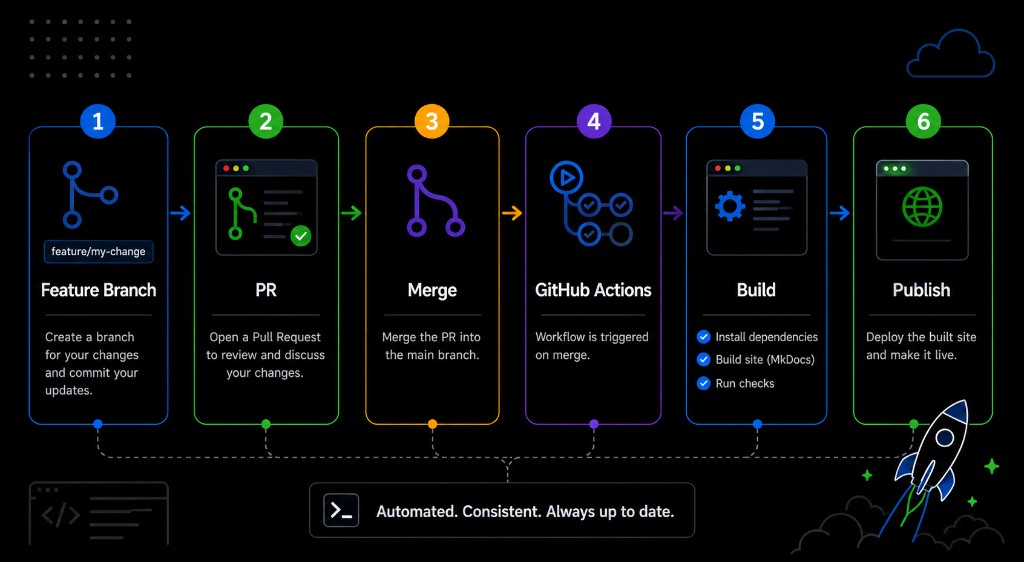
This made the documentation process feel familiar to engineers. Changes could be made on a feature branch, reviewed in a pull request, merged when ready, and then automatically built and published through GitHub Actions. GitHub Pages provided the hosting layer, which kept the solution simple and cost-effective.
That approach also improved trust. The published documentation was not a separate artifact maintained by hand. It was the output of the repository. If the repository changed, the site changed. If the build failed, the issue was visible. If a document needed review, it followed the same review process as other technical changes.
Branding, Navigation, and the Value of Curiosity
After the first working version of the site existed, my attention shifted from "Can this work?" to "Can this feel like something people will actually use?"
One small but important example was branding. I noticed that our internal portals consistently included the corporate logo. The documentation site looked functional, but without the logo it felt disconnected from the rest of the internal application experience. That observation led to another round of investigation: how to customize the MkDocs theme, how to add the logo, how to adjust the header, and how to make the site feel more like a first-class internal portal.
That pattern repeated throughout the project. Once the site existed, curiosity kept improving it. Could we add breadcrumbs? Could we improve the hierarchy? Could we show recently updated documents? Could we exclude deprecated or internal engineering files from certain views? Could we make navigation more intuitive? Could we make the documentation easier to browse for both engineers and business users?
Many of the improvements were not part of the original requirement. They came from using the site, noticing friction, and asking whether MkDocs or automation could solve it.
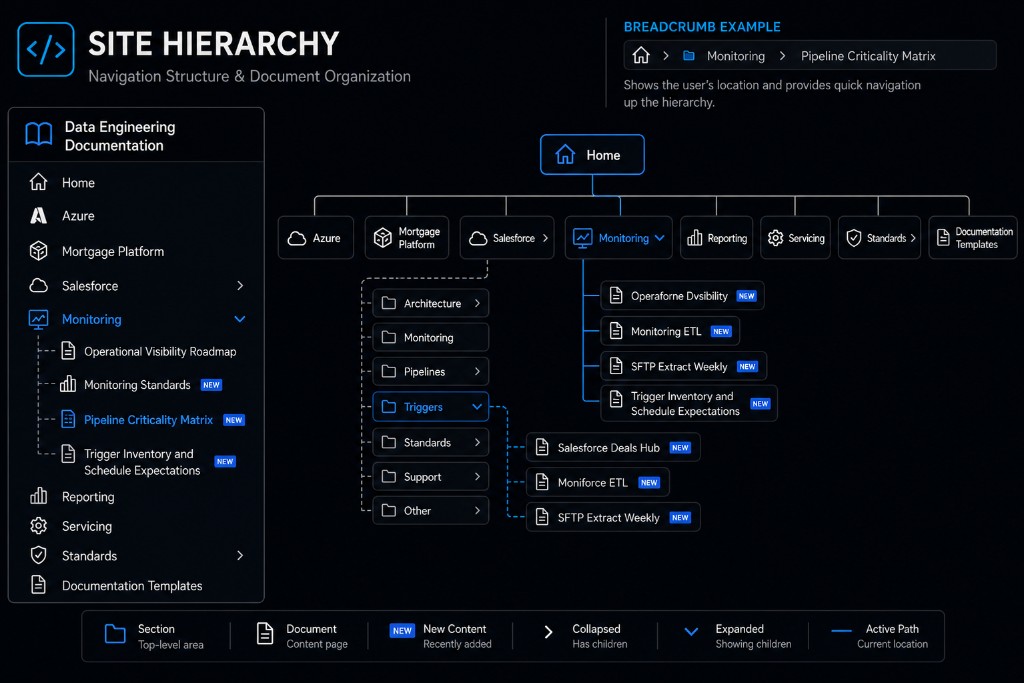
The navigation structure became especially important as the documentation grew. The site needed to support monitoring documentation, CRM subsystem documentation, standards, support information, reporting, servicing, and templates. A flat list of pages would not scale. A thoughtful hierarchy, supported by breadcrumbs and search, made the site easier to understand.
What I Learned About MkDocs
MkDocs worked because it respected the way technical documentation is actually created. It did not require a database, a custom application, or a complicated publishing workflow. It let the documentation stay in Markdown and Git while still producing a professional browser-based site.
The Material theme added a lot of value without requiring extensive customization. Navigation, search, layout, branding, and usability features were available quickly. That speed mattered because the goal was not to spend months building a documentation product. The goal was to create a useful platform that supported the monitoring framework and the documentation being generated from real subsystem work.
The more I used MkDocs, the more I appreciated the balance it provides. It is simple enough to start quickly, but extensible enough to support automation, branding, custom navigation, metadata, and CI/CD publishing. For this project, that balance was exactly what was needed.
What I Learned About AI
The project also changed how I think about AI in engineering work.
AI was valuable because it helped me keep momentum. When I had a question, I could ask it immediately. When I needed options, I could get a starting point. When I needed to understand a tool, I could get an explanation in the context of what I was building. When I needed code, I could generate a draft and then refine it.
That does not remove the need for judgment. In fact, it makes judgment more important. AI can suggest options, but I still had to decide what fit the environment, what was maintainable, what was too complex, and what solved the actual problem. The best results came when I treated AI as a collaborator: useful for exploration, acceleration, drafting, troubleshooting, and refinement, but not as a substitute for understanding the system.
It also helped with the writing itself. Turning a technical journey into a readable article is not always easy, especially when the work spans architecture, automation, documentation, hosting, and user experience. AI helped organize the story, improve phrasing, and make the final article clearer.
Lessons Learned
Several lessons stood out by the end of the project:
- Start with the real user problem. In this case, the problem was not "we need a static site generator." The problem was "we need a place to store and read the documentation being created for pipeline monitoring and subsystem knowledge."
- Markdown is an excellent source format, but users need a better reading experience than opening files in VS Code.
- MkDocs is a strong fit when simplicity, cost, time to market, and maintainability matter.
- GitHub Pages and GitHub Actions make documentation publishing feel like a natural extension of the engineering workflow.
- Git metadata is too valuable to ignore. If Git already knows when a document changed, automation should use that information.
- Python is a practical choice for documentation automation because of its ecosystem and readability.
- AI can dramatically reduce the time required to learn unfamiliar tools, compare options, write automation, and troubleshoot implementation details.
- Curiosity matters. Many valuable improvements, including branding, breadcrumbs, navigation refinements, and metadata automation, came from asking whether the site could be better.
Conclusion
What began as a need to support a pipeline monitoring framework became a full documentation platform. The monitoring work created the need for pipeline inventories, trigger inventories, schedule expectations, criticality definitions, operational visibility planning, and standards. CRM subsystem training created the need to capture architecture and process knowledge before it disappeared into tribal memory. Markdown gave the documentation a simple and durable source format, but MkDocs turned those files into a usable site.
GitHub Pages made hosting simple. GitHub Actions made publishing automatic. Python made metadata and content automation practical. MkDocs provided the documentation platform. AI helped connect the pieces and made the entire process faster.
The most important outcome is not just that the site exists. It is that the documentation process now feels sustainable. New knowledge can be captured as Markdown, reviewed through Git, enriched through automation, published through CI/CD, and consumed through a browser-based documentation portal.